AI lead qualification and instant follow-up
Claude scores every new lead hot, warm, or cold, sends the right follow-up, and asks sales to call hot leads within 15 minutes.
- The problem
- New leads waited in the CRM until someone read their answers, judged how serious they were, and followed up. The hottest leads could go cold before anyone called.
- What I built
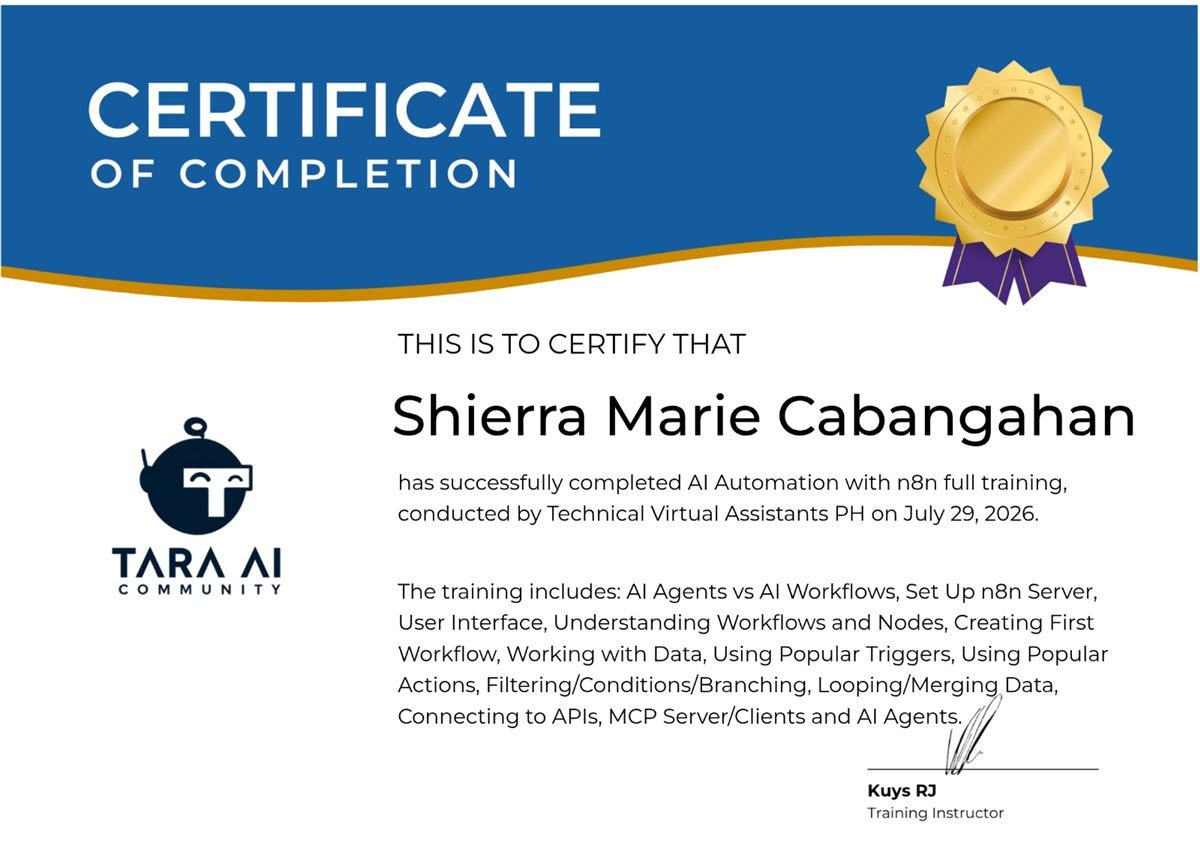
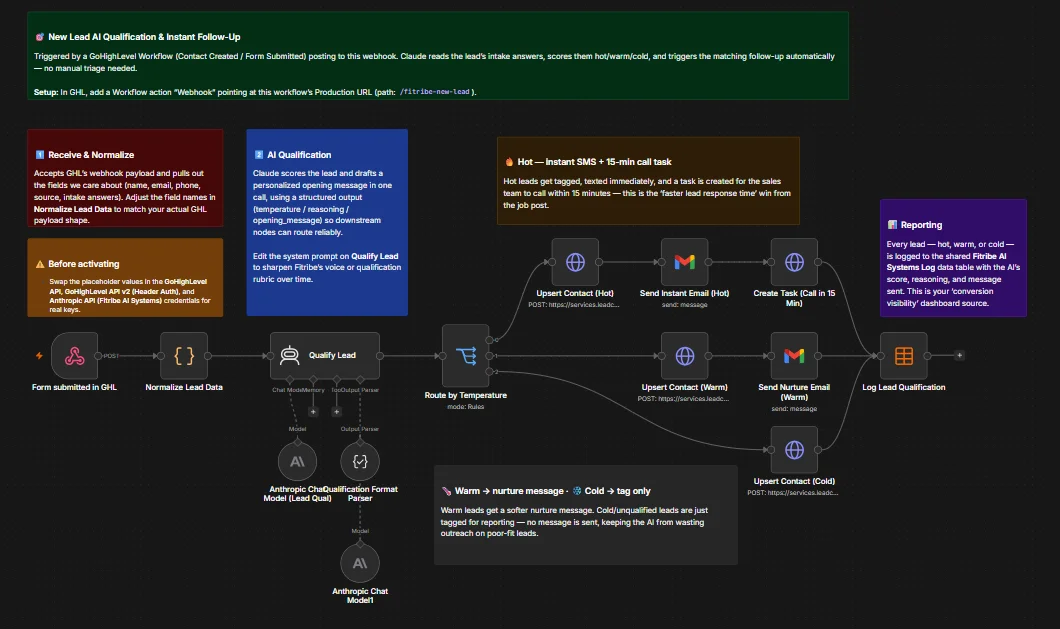
- An n8n workflow triggered by HighLevel whenever a contact is created or a form is submitted. It cleans up the lead's details, then Claude scores the lead hot, warm, or cold and drafts a personalized opening message. Hot leads are updated in the CRM, emailed right away, and get a task for the sales team to call within 15 minutes. Warm leads get a softer nurture email. Cold leads are only tagged, so no outreach is wasted on poor fits. Every lead is logged with the AI's score and reasoning.
- The result
- Every new lead is qualified and followed up the moment it arrives, with no manual sorting. Sales knows exactly who to call first, and the log shows lead quality and the message each lead received.
No-show and missed appointment recovery
Missed or cancelled appointments get a friendly reschedule message, and anyone who hasn't rebooked in 48 hours goes to the team.
- The problem
- When a client missed or cancelled an appointment, rebooking depended on someone noticing and reaching out. Many no-shows were simply never followed up.
- What I built
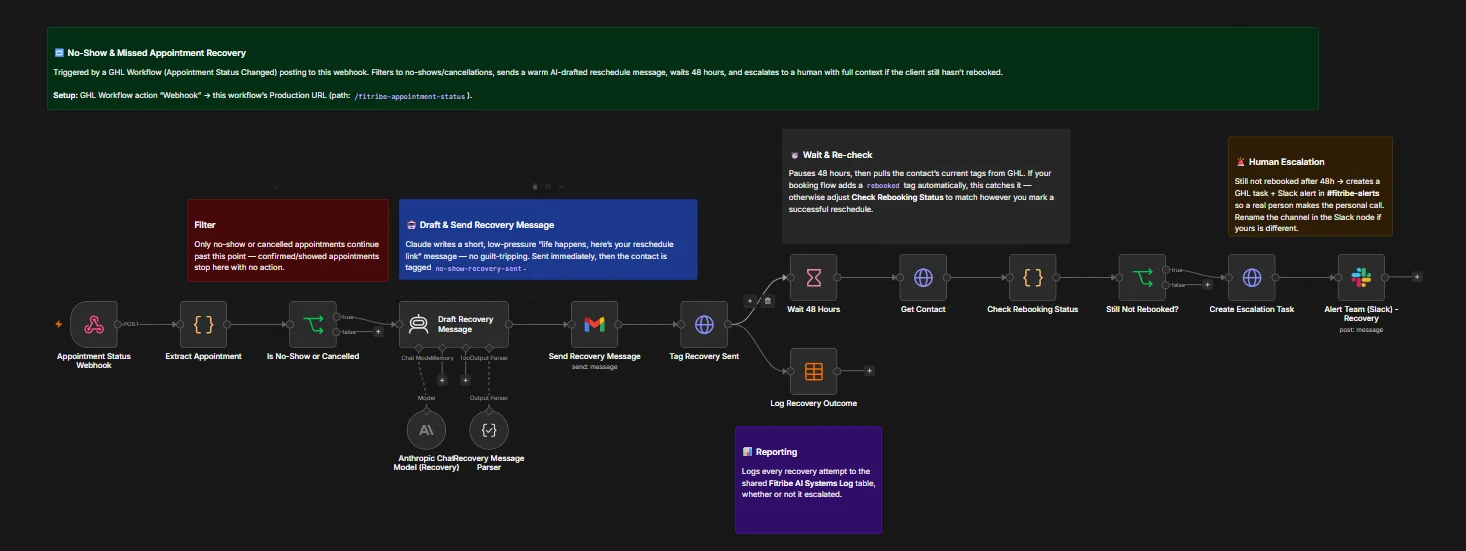
- An n8n workflow triggered by HighLevel when an appointment's status changes. Appointments that went ahead are ignored; only no-shows and cancellations continue. Claude writes a short, no-pressure message with a reschedule link, which is emailed right away, and the contact is tagged. After 48 hours the workflow checks whether the client has rebooked. If not, it creates a follow-up task in the CRM and alerts the team on Slack so a person can call. Every recovery attempt is logged.
- The result
- Every missed appointment gets a polite reschedule message automatically. Only clients who still haven't rebooked after two days reach the team, with the full context for a personal call.
AI inbox reply with human handover
Claude answers routine email replies on its own and hands anything sensitive to a person, with a suggested reply ready.
- The problem
- Customer replies piled up in the inbox. Routine questions waited for someone to answer them, and sensitive messages risked a rushed or wrong reply.
- What I built
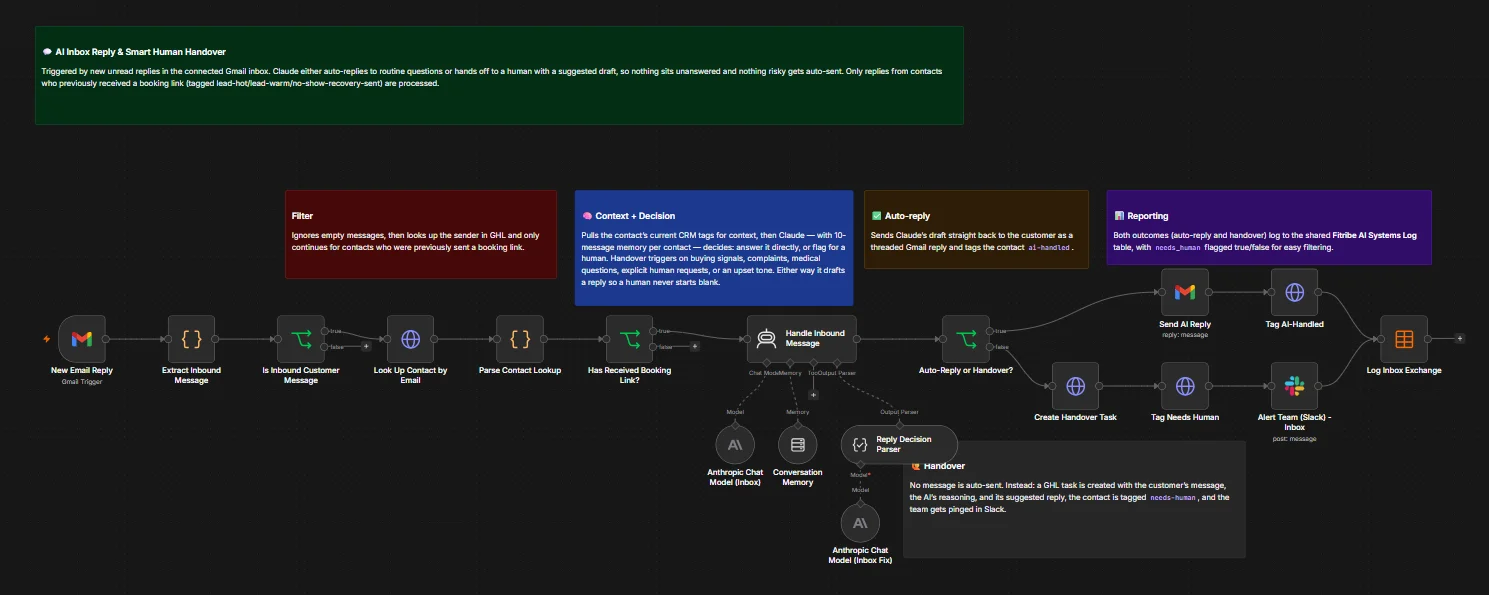
- An n8n workflow that watches Gmail for new replies from contacts who were already sent a booking link. It looks up each sender in HighLevel for context, then Claude, remembering the last 10 messages with that contact, decides whether to answer or hand over. Routine questions get a threaded reply sent automatically. Buying signals, complaints, medical questions, requests for a person, or an upset tone go to the team instead: a CRM task is created with the customer's message, the AI's reasoning, and a suggested reply, and the team is pinged on Slack. Both outcomes are logged.
- The result
- Routine replies are answered without waiting, nothing risky is sent automatically, and when a person needs to step in, they start from a ready draft instead of a blank email.
Lead capture with lead scoring
New form leads are saved to Google Sheets, sorted hot, warm, or cold by budget, and announced to the team in Gmail and Slack.
- The problem
- Leads from an inquiry form landed in one pile. Someone had to read each one, judge how serious it was, copy it into a spreadsheet, and tell the team, so promising leads could wait hours for a reply.
- What I built
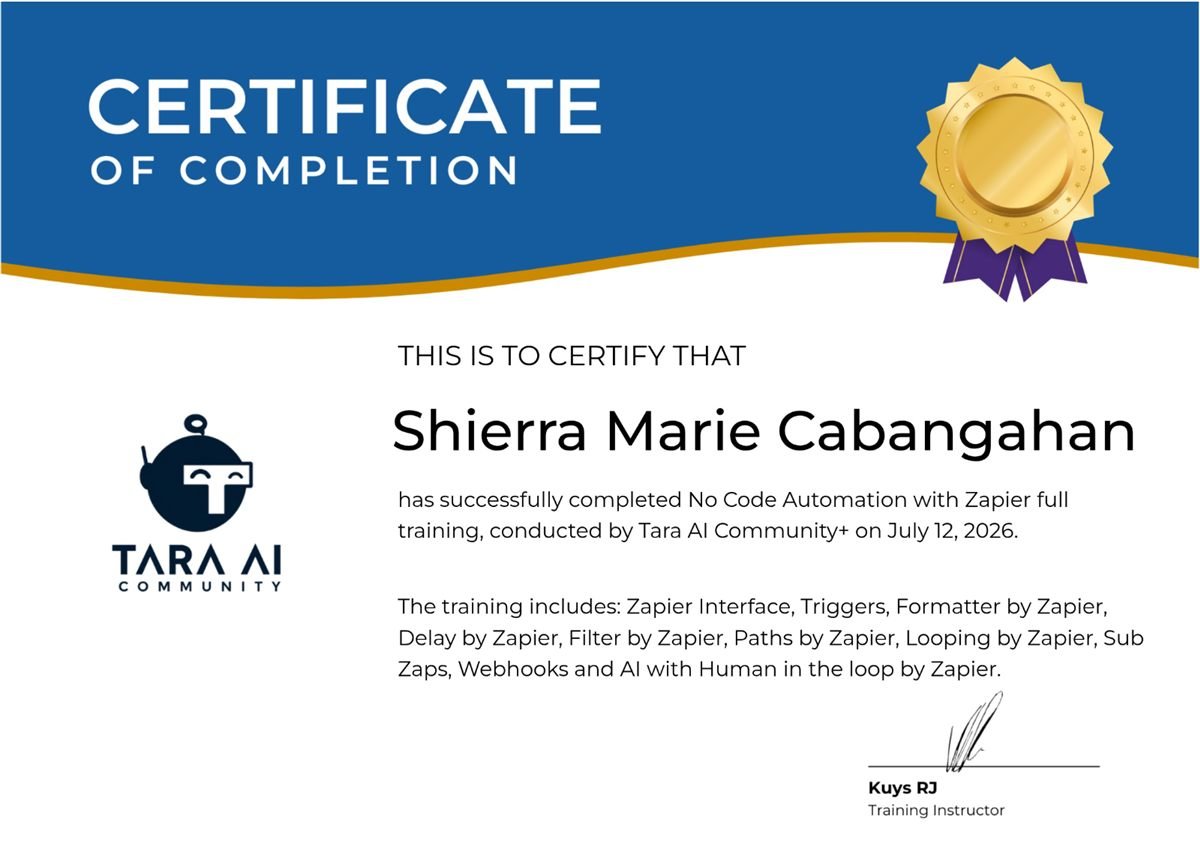
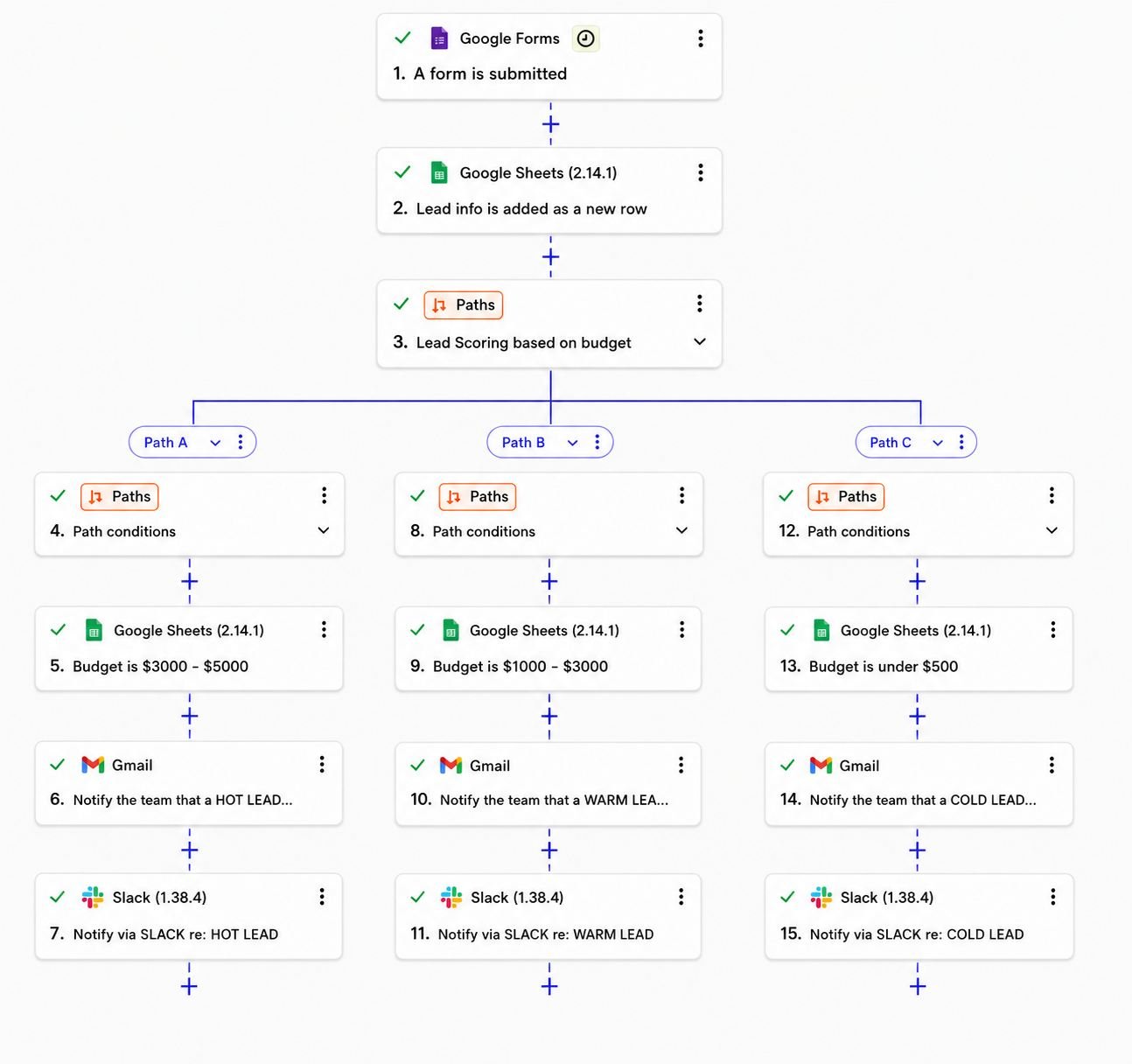
- A Zapier workflow that runs on every new Google Forms submission. It saves the lead to Google Sheets, sends it down one of three paths based on the budget the lead entered (hot, warm, or cold), and posts a matching alert to the team in Gmail and Slack.
- The result
- Every lead is logged and labeled the moment it arrives, with no copy-pasting. The team sees the highest-budget leads first and can reply to hot leads right away, while warm and cold leads are still on record for follow-up.
Client appointment scheduling
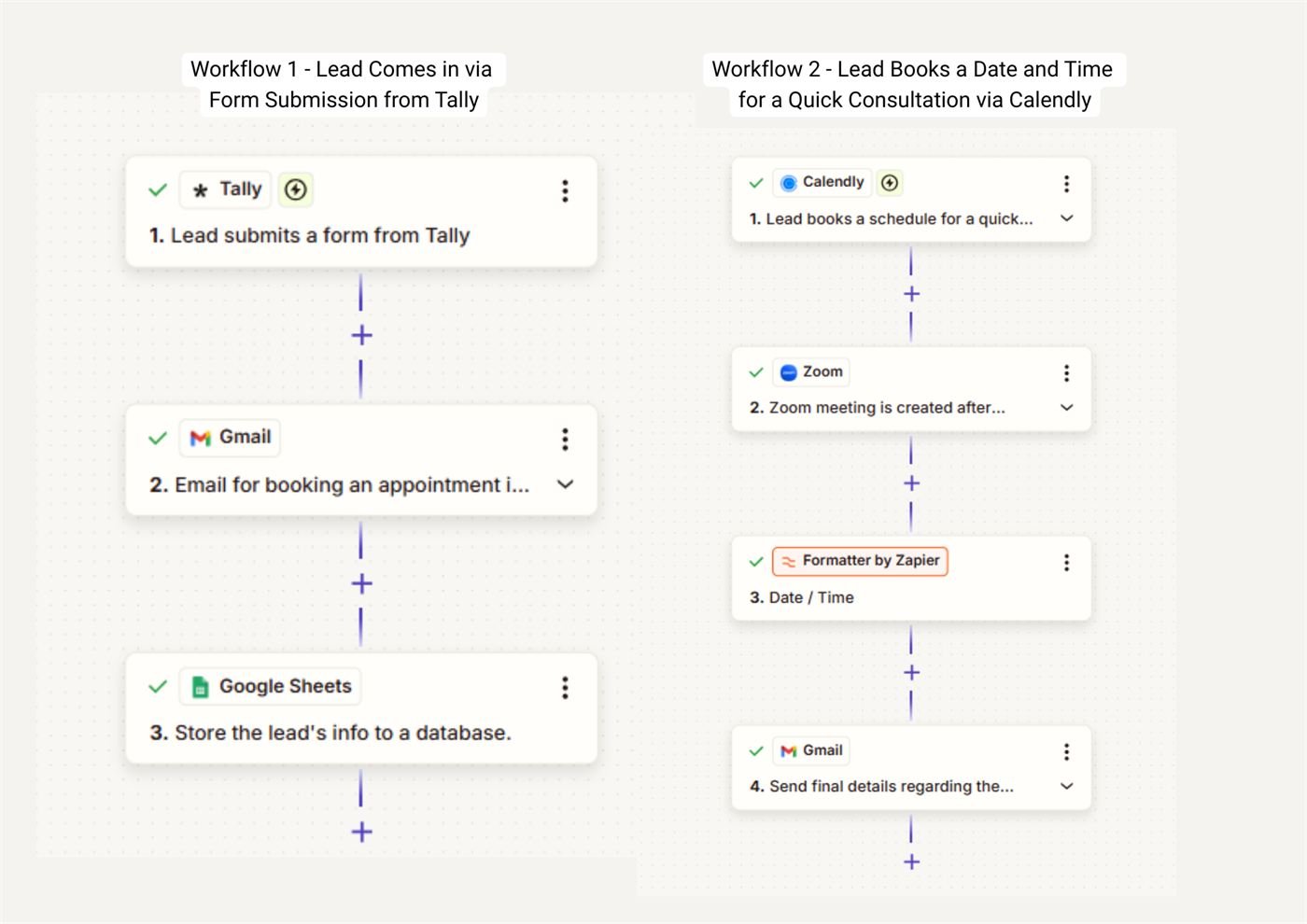
Form leads get a booking email. When they book in Calendly, a Zoom meeting is created and the details are sent automatically.
- The problem
- Booking a consultation took several back-and-forth messages: sending a booking link, agreeing on a time, creating a meeting link, and emailing the details.
- What I built
- Two connected Zapier workflows. When a lead submits a Tally form, they get an email with a booking link and their details are saved to Google Sheets. When they pick a time in Calendly, a Zoom meeting is created, the date and time are formatted, and a confirmation email with the meeting details goes out.
- The result
- Leads go from form to confirmed meeting without anyone typing an email or creating a meeting link by hand. Every lead is stored in one sheet, and confirmations go out as soon as a time is booked.
Asana sales pipeline
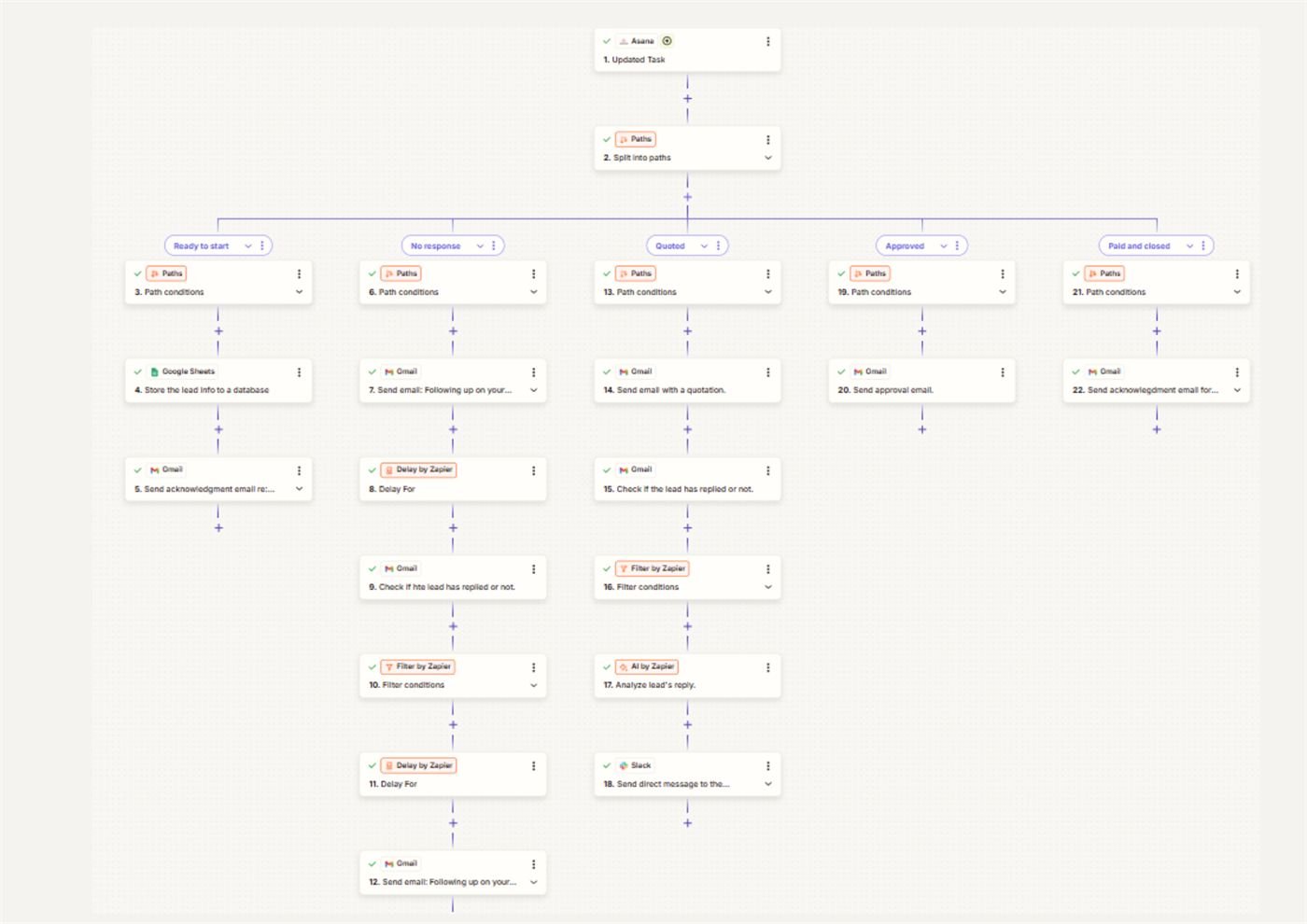
Moving a deal in Asana sends the right next email: a welcome, follow-ups when there's no reply, a quotation, or an approval.
- The problem
- Following up with leads depended on someone remembering where each deal stood and sending the right email at the right time. Deals that went quiet were easy to forget.
- What I built
- A Zapier workflow that runs whenever a deal changes stage in Asana. Each stage has its own path. Ready to start saves the lead and sends an acknowledgment. No response sends follow-ups after a set delay and checks for a reply. Quoted sends the quotation, checks for a reply, uses AI to read it, and alerts the team on Slack. Approved and Paid and closed send their own emails.
- The result
- Moving a card in Asana is now the only manual step. The right email goes out at every stage, follow-ups happen on schedule instead of from memory, and the team hears on Slack when a lead replies to a quote.
Video to social posts
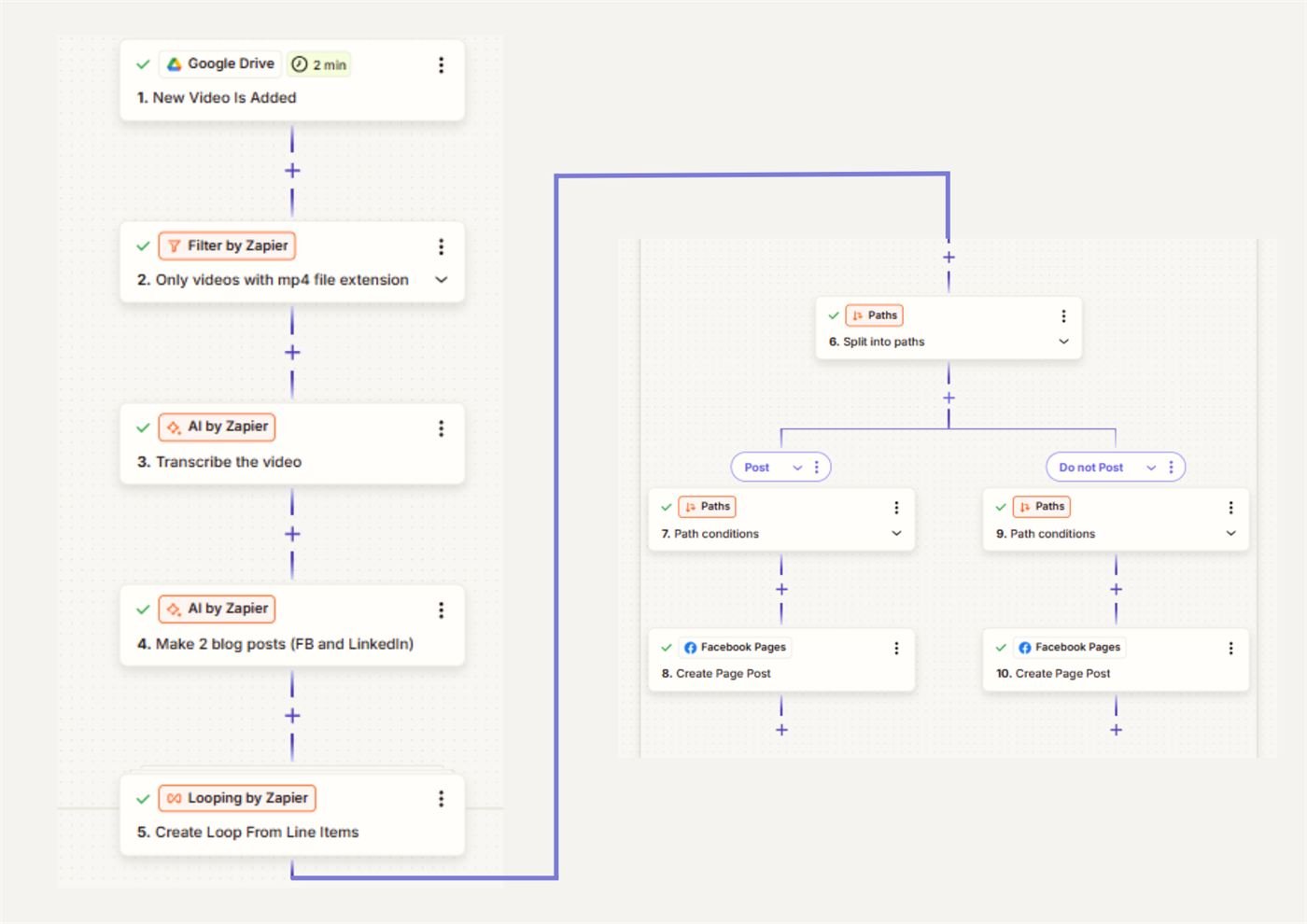
A new video in Google Drive is transcribed with AI, turned into Facebook and LinkedIn posts, and published to a Facebook Page.
- The problem
- Turning each video into written posts meant watching it, writing a caption for each platform, and posting them one by one.
- What I built
- When a new MP4 lands in a Google Drive folder, Zapier transcribes it with AI and writes two posts from the transcript, one for Facebook and one for LinkedIn. It then loops through the posts and routes each one through a publish check before it goes to the Facebook Page.
- The result
- One video upload turns into ready-to-use social posts. Existing videos keep producing written content without anyone rewriting them by hand.
Email attachment organizer
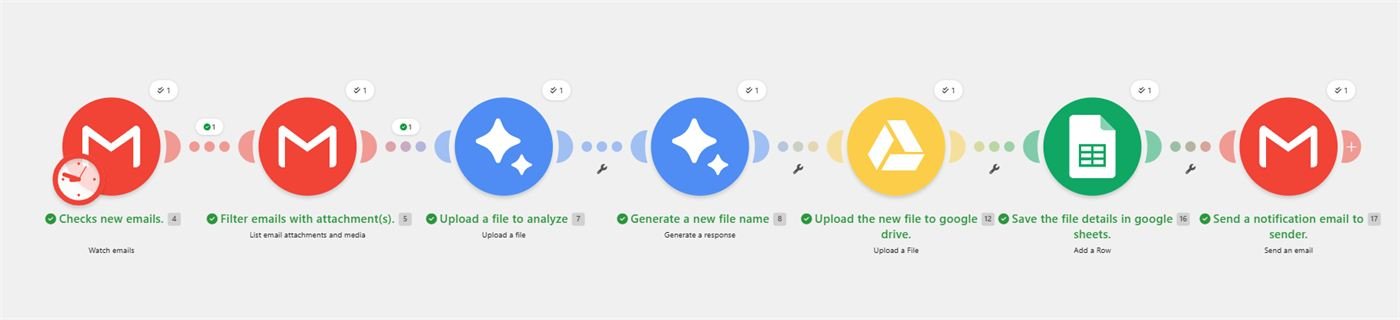
Gemini AI reads new email attachments, renames them, saves them to Google Drive, logs them in Sheets, and confirms with the sender.
- The problem
- Files sent by email had to be downloaded, renamed so they could be found later, uploaded to the right folder, and logged. Senders often had no confirmation that their file arrived.
- What I built
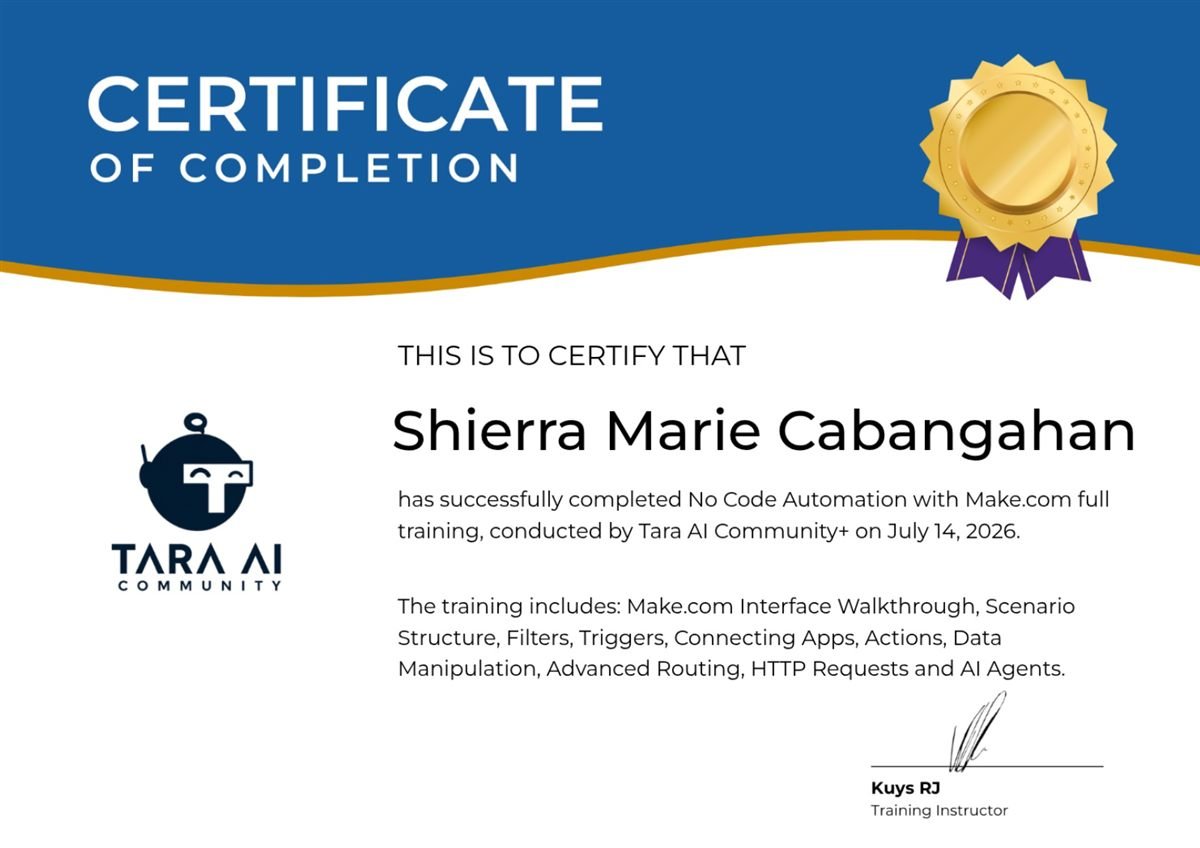
- A Make scenario that watches Gmail for new emails with attachments. Gemini AI reads each file and suggests a clear name, the file is uploaded to Google Drive, its details are added to a Google Sheet, and the sender gets an automatic email confirming it was received.
- The result
- Attachments are filed with consistent names and logged in one sheet automatically, so nothing gets lost in an inbox. Senders know right away that their file was received.
AI phone receptionist
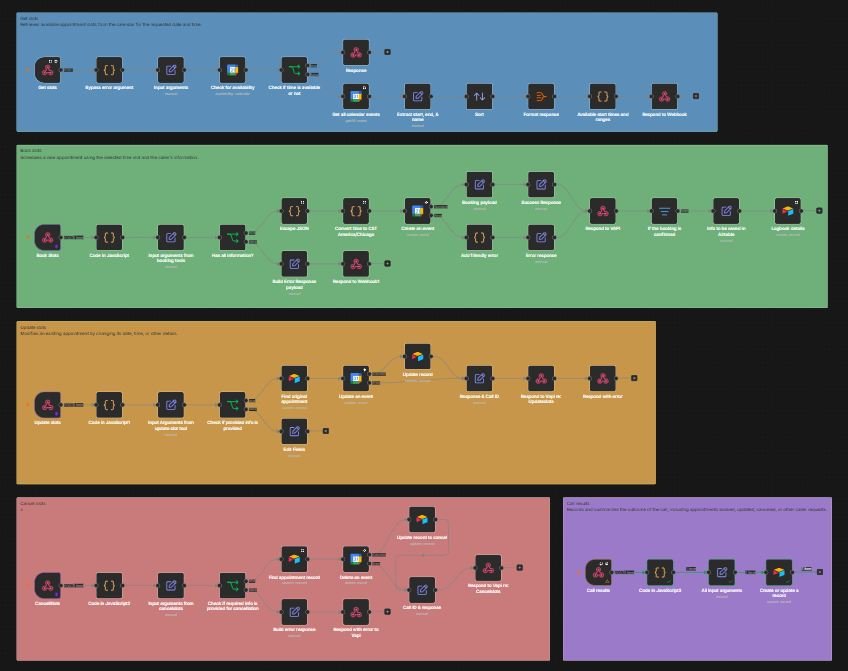
A voice assistant checks calendar availability, books, changes, or cancels appointments, and logs every call in Airtable.
- The problem
- Missed calls meant missed bookings, and someone had to be on the phone to check the calendar and book, reschedule, or cancel appointments.
- What I built
- A Vapi voice assistant connected to n8n workflows. During a call it can check open times in Google Calendar, book a new appointment, update an existing one, or cancel it, and each change is mirrored in Airtable. When the call ends, its outcome is logged in Airtable.
- The result
- Callers can book, change, or cancel appointments by phone without a person answering. The calendar and the Airtable records stay in sync, and every call is on record.
AI job search assistant
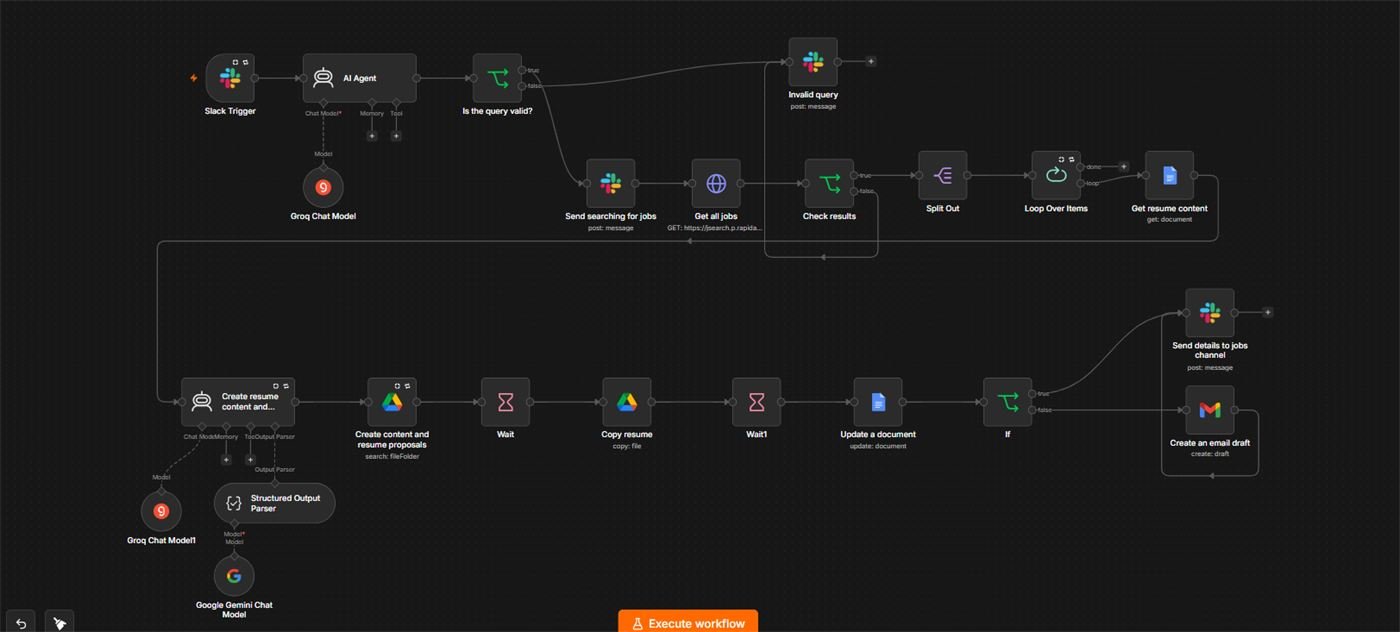
Ask in Slack for a job search. It finds matching jobs, drafts tailored resume content in Google Docs, and sends the results back.
- The problem
- Searching job boards and tailoring a resume and proposal for every listing is slow, repetitive work.
- What I built
- An n8n workflow that starts from a Slack message. An AI agent checks the request and searches for matching jobs through a jobs API. For each result, it reads the base resume from Google Docs, writes tailored resume content and a proposal, saves a copy in Google Drive, and then posts the details to a Slack channel or creates a Gmail draft.
- The result
- One Slack message returns matching jobs with tailored resume content and proposals ready to review, instead of searching and rewriting for each listing by hand.
Scheduled AI video uploads
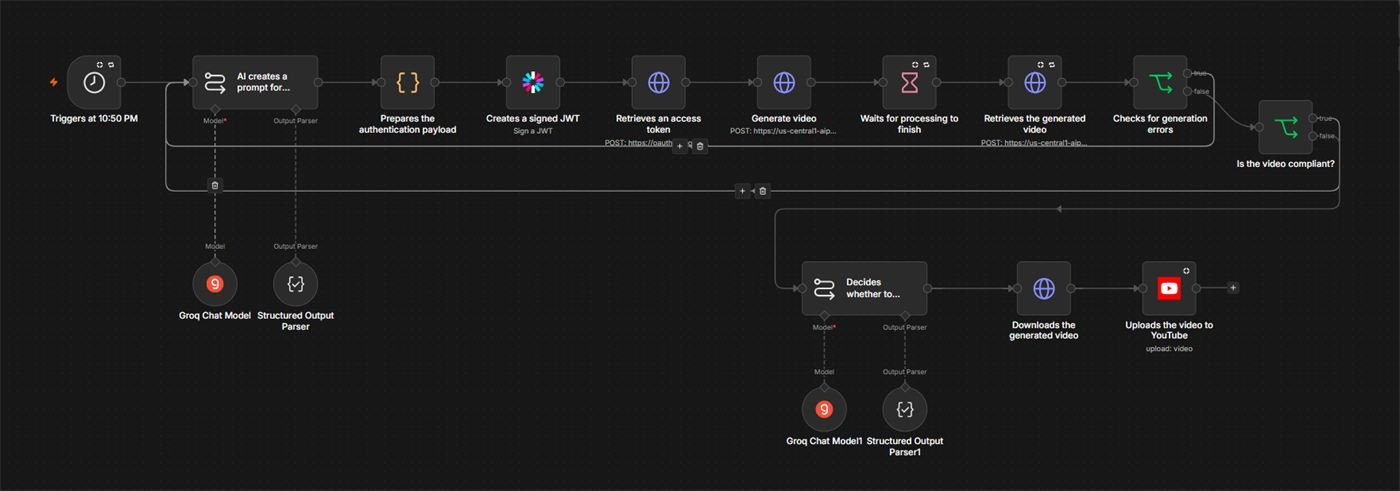
Every night, AI writes a prompt, generates a short video, checks it, and uploads it to YouTube.
- The problem
- Posting short videos on a schedule means coming up with an idea, producing the video, and uploading it, every single day.
- What I built
- An n8n workflow that runs every night at 10:50 PM. AI writes a video prompt, the video is generated with Google Cloud's video AI, and the workflow waits for it to finish and checks for errors. AI then reviews whether the video is compliant, and approved videos are downloaded and uploaded to YouTube.
- The result
- A YouTube channel gets a new video every night with no manual production or uploading, and the built-in review keeps videos that fail the check from being posted.